How Does SMTP Work – A Complete Guide to Email Delivery Protocols
Email has become one of the most essential forms of communication in the digital world, both for personal and professional use. But have you ever wondered how email protocol works when you hit the “Send” button? That’s where SMTP, or Simple Mail Transfer Protocol, comes in. Understanding how does SMTP work is crucial for anyone managing email systems or sending bulk messages through services like bulletproofsmtpserver.
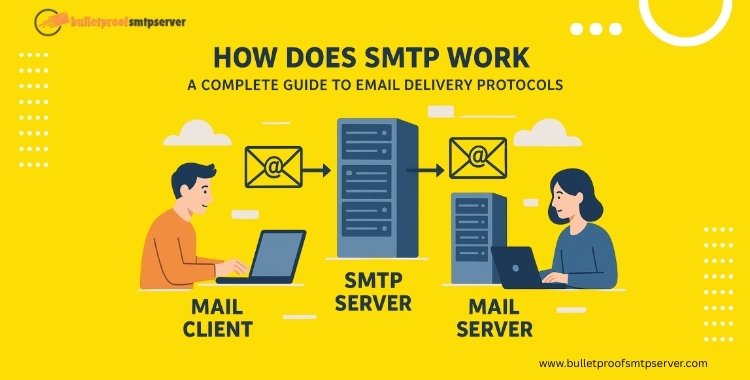
The function of SMTP protocol is to govern how emails are sent from one server to another over the Internet. It acts as the digital postman that ensures every message reaches the correct destination, following a predefined and secure process. The smtp working principles involve a client-server model where the email client initiates a connection with an SMTP server, authenticates the sender, and delivers the message using specific commands.
The work flow of SMTP includes steps such as sender verification, message composition, command execution (MAIL FROM, RCPT TO, DATA), and delivery—either directly or via SMTP relay. Services like bulletproofsmtpserver are built on these principles to offer reliable, secure, and high-volume email delivery solutions.
By understanding the operation of SMTP, you can optimize your communication strategies, reduce delivery errors, and improve inbox placement, especially in email marketing and transactional messaging.
What is SMTP?
SMTP (Simple Mail Transfer Protocol) is a communication protocol used to send and relay emails from one server to another. It defines the function of SMTP protocol in managing how messages are formatted, routed, and delivered from sender to recipient. When you click “Send” on an email, SMTP takes over, acting as the virtual postman that ensures your message travels safely across networks to the correct mailbox.
In simple terms, if email were a letter, SMTP would be the postal service, responsible for transporting your message to the right destination.
If you’re using a high-volume or commercial email platform like bulletproofsmtpserver, the operation of SMTP becomes even more critical. These platforms rely on robust SMTP implementations to handle millions of messages with authentication, encryption, and optimized delivery speeds.
Why is SMTP Important for Email Delivery?
Without SMTP, email communication would not be possible. Here’s why it’s essential:
- It standardizes the workflow of email transmission across different systems and servers.It supports SMTP authentication, which helps verify legitimate senders and reduce spam.
- It enables SMTP relay, allowing messages to pass through multiple servers until they reach the destination.
- It works with encryption protocols like TLS, securing your emails in transit. Understanding how does SMTP work is crucial for anyone involved in email marketing, web development, or IT infrastructure. For example, marketers who use services like bulletproofsmtpserver benefit from secure and efficient message delivery, ensuring emails land in inboxes, not spam folders.
SMTP Working Principles Explained
To truly understand how does SMTP work, we need to dive into the core principles that govern the operation of SMTP. From establishing connections to relaying messages between servers, SMTP ensures that emails travel efficiently across the internet.
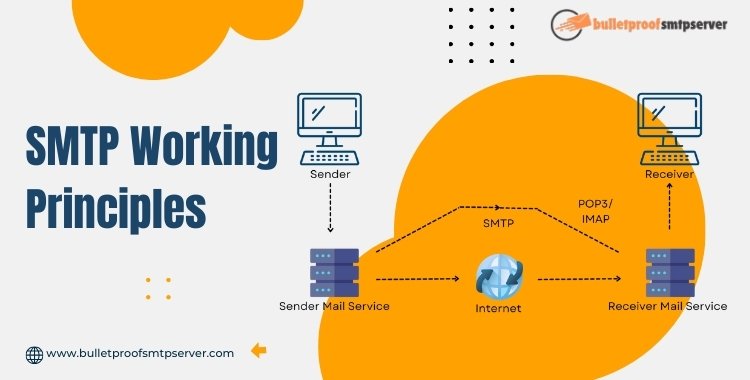
At its core, the function of SMTP protocol is to transfer email messages from a client (usually an email application like Outlook or Gmail) to a receiving mail server. This is done through a series of standardized commands and responses that form the workflow of SMTP.
Here’s a simplified overview of SMTP working principles:
The sender’s email client opens a connection to an SMTP server.
- The server authenticates the sender using SMTP authentication (typically via login credentials).
- The email message is submitted using specific SMTP commands such as MAIL FROM, RCPT TO, and DATA.
- Once the message is accepted, it is either delivered to the recipient server or relayed to the next SMTP server in the path.
- Upon successful transmission, the connection is closed.
- This process is governed by specific rules that define how email protocol works, ensuring every message is handled consistently and securely.
The Role of Servers in Email Transfer
In the operation of SMTP, servers play two critical roles: sending (outgoing) servers and receiving (incoming) servers. The sender’s SMTP server is responsible for initiating the message transfer, while the receiving server stores the message until it is retrieved by the recipient via protocols like IMAP or POP3.
1. Sender’s SMTP Server (Mail Submission Agent – MSA)
2. The Operation of SMTP Protocol
3. Use of SMTP Relay (Mail Transfer Agent – MTA)
4. Recipient’s Mail Server (Mail Delivery Agent – MDA)
5. Security & Compliance Measures
6. Error Handling and Response Codes
7. Server Reputation and Deliverability
How Does SMTP Work Step by Step
To fully grasp how does SMTP work, it’s helpful to break the process into actionable steps. Whether you’re sending a single message or thousands using a service like bulletproofsmtpserver, the workflow of SMTP follows the same set of principles. Here’s a detailed step-by-step look at how emails move from sender to receiver using SMTP.

Step 1: Connection Initiation
The process begins when an email client (like Outlook or Thunderbird) initiates a connection to an SMTP server on a standard port (usually 25, 465, or 587). At this stage:
- The client identifies itself using the EHLO or HELO command.
- SMTP authentication occurs, where the sender must provide login credentials.
If supported, the client and server negotiate TLS encryption, securing the connection (this is how smtp TLS works) to prevent eavesdropping or data tampering.
Example:
bash
CopyEdit
EHLO yourdomain.com
AUTH LOGIN
<base64-encoded username>
<base64-encoded password>
Step 2: Sender Email Verification
Once authenticated, the server processes the MAIL FROM: command. This specifies the sender’s email address. The operation of SMTP ensures that this step validates the sender’s domain and permissions to avoid spoofing.
bulletproofsmtpserver, for example, enforces strict SMTP authentication policies to reduce spam and maintain a trusted sending reputation.
Step 3: Message Composition and Transmission
After the sender is verified, the client submits the recipient’s address using the RCPT TO: command, followed by the DATA command to begin transmitting the actual message.
Here’s what happens:
- Message headers (From, To, Subject) and body content are sent.
- The email ends with a single line containing only a period (.) to indicate completion.
- The server responds with a success message and prepares to relay the message.
Step 4: SMTP Relay & Handoff
This is where SMTP relay comes into play. If the recipient is on a different domain or server, the email is forwarded or “relayed” to another SMTP server closer to the recipient.
This step explains how SMTP relay works:
- The original SMTP server looks up the recipient domain’s MX (Mail Exchange) record.
- It connects to that server and hands over the message using the same SMTP commands.
- The message may pass through multiple relays before reaching the final destination.
- Services like bulletproofsmtpserver specialize in reliable and secure relays, ensuring high deliverability rates for large campaigns and transactional emails.
Step 5: Email Receipt and Delivery by Recipient Server
Finally, the recipient’s mail server receives the message and stores it in the inbox or spam folder, depending on the sender’s reputation and message content.
This step concludes the function of SMTP protocol. The receiving server then makes the message accessible to the end user via IMAP or POP3 protocols.
Practical Example: Sending an Email Using Telnet
Using Telnet, you can simulate the operation of SMTP from a terminal. Here’s a simplified demo:
bash
CopyEdit
telnet smtp.yourdomain.com 25
EHLO yourdomain.com
AUTH LOGIN
<encoded username>
<encoded password>
MAIL FROM:<you@yourdomain.com>
RCPT TO:<friend@example.com>
DATA
Subject: Test SMTP Email
Hello, this is a test email using Telnet and SMTP.
.
QUIT
This command-line interaction shows how email protocol works in real-time, using basic SMTP commands without an email client.
Using platforms like bulletproofsmtpserver, this process is automated, optimized, and secured for both individual and bulk senders. Still, understanding how does SMTP work step by step gives you control and insight over your email strategy, troubleshooting, and delivery success.
How SMTP Works with Diagram

Understanding the Operation of SMTP
To master how does SMTP work, it’s important to look closely at the actual operation of SMTP, how commands are issued, responses are handled, and how secure communication is established during email transfer.
SMTP Commands
SMTP operates through a sequence of client-server commands that facilitate the sending of emails. Here are the essential SMTP commands used during the workflow of smtp:
HELO or EHLO: Initiates the conversation and identifies the client to the server.
MAIL FROM: Specifies the sender’s email address.
RCPT TO: Indicates the recipient’s email address.
DATA: Marks the start of the message content (headers + body).
QUIT: Terminates the session once the message is sent.
Each of these commands plays a vital role in ensuring the function of smtp protocol is executed properly.
Services like bulletproofsmtpserver process these commands efficiently and securely, handling high volumes of email traffic without errors or delays.
Common SMTP Response Codes
The SMTP server replies to each command with a numeric response code, indicating the status of the transaction. Here are some common ones:
Code Meaning
220 Server ready
250 Requested action completed
354 Start mail input (DATA)
421 Service not available
450 Mailbox unavailable
550 Requested action not taken (spam/blocked)
These codes help email clients and servers understand what’s working and what needs to be retried or fixed.
SMTP Ports and Encryption (How SMTP TLS Works)
SMTP uses different ports for different types of connections. Here’s a quick breakdown:
Port 25: Default port for SMTP; mostly used for SMTP relay between servers (but often blocked for client mail submission due to spam concerns).
Port 465: Legacy port for SMTP over SSL (implicit TLS).
Port 587: Recommended port for email submission with STARTTLS (explicit TLS).
How SMTP TLS works:
When an email client connects to an SMTP server (like bulletproofsmtpserver) over port 587 or 465, the server and client agree to use TLS (Transport Layer Security) to encrypt the connection. TLS prevents attackers from intercepting or tampering with the message in transit, protecting both the content and credentials.
Whether you’re a marketer using bulletproofsmtpserver or a developer building an email app, understanding how SMTP TLS works is critical for ensuring data privacy and secure delivery.
Understanding the operation of SMTP, including its commands, responses, and security protocols, forms the technical foundation for reliable email communication. It also enhances your ability to troubleshoot issues, configure mail servers correctly, and choose the right infrastructure, such as bulletproofsmtpserver, to support your needs.
SMTP Authentication and Security Measures
When discussing how does SMTP work, it’s crucial to address the security mechanisms that ensure only legitimate users can send emails. Without these, the internet would be flooded with spam, phishing, and malicious messages. This is where SMTP authentication and encryption protocols like TLS and SSL come into play.

Understanding the security layer is essential to mastering how does SMTP work. Below are the key elements that define modern SMTP authentication and encryption practices:
What is SMTP Authentication
SMTP authentication is a security layer that verifies the sender before allowing an email to be sent.
It prevents unauthorized users from abusing the SMTP server to send spam or phishing emails.
How SMTP auth works: The email client connects to the SMTP server, submits credentials, and only upon successful verification is the message accepted.
Why SMTP Authentication is Essential
Blocks unauthenticated users from sending email through your domain.
Reduces the risk of spam, spoofing, and blacklisting.
Enhances trust and deliverability, especially important when using services like bulletproofsmtpserver.
Role of TLS and SSL in SMTP Security
SMTP TLS work: TLS encrypts the data exchanged between the email client and SMTP server, securing credentials and message content.
SSL/TLS ensures email security during transmission, safeguarding against eavesdropping or tampering.
TLS is activated via the STARTTLS command after the initial connection.
How bulletproofsmtpserver Implements Security
Enforces smtp authentication to protect against spam and IP blacklisting.
Supports modern TLS encryption standards for data protection.
Offers detailed logging and analytics to monitor the operation of smtp in real-time.
Additional Best Practices for SMTP Security
Always use strong, unique SMTP credentials.
Implement SPF, DKIM, and DMARC records to support domain-level authentication.
Avoid open relay configurations to protect your server from abuse.
Test configurations using tools like Mailtrap or smtp-cli.
What is SMTP AUTH? (How SMTP Auth Works)
SMTP AUTH (SMTP Authentication) is an extension of the SMTP protocol that allows an email client or sender to log in before sending an email. It requires valid credentials—typically a username and password, ensuring the server verifies the sender’s identity before accepting any outbound messages.
How SMTP auth works step by step:
- The client connects to the SMTP server.
- It initiates the handshake using EHLO or HELO.
- The server advertises supported authentication methods (e.g., LOGIN, PLAIN, CRAM-MD5).
- The client submits credentials (often Base64-encoded).
- If authentication is successful, the server proceeds to accept and relay the email.
Reliable providers like bulletproofsmtpserver enforce strict SMTP AUTH protocols, preventing unauthorized access and reducing the risk of IP blacklisting due to spam abuse.

Why SMTP Authentication is Important for Spam Protection
In the absence of SMTP authentication, any user could impersonate another email address and misuse the server to send spam or phishing emails. Authentication plays a key role in:
- Preventing email spoofing
- Ensuring only authorized users can send from specific domains
- Improving email deliverability by building sender reputation
- Enabling compliance with SPF, DKIM, and DMARC policies
- With providers like bulletproofsmtpserver, businesses benefit from robust authentication mechanisms that safeguard their brand reputation and boost email performance.
TLS & SSL in SMTP Communication (How SMTP TLS Works)
Encryption is another vital part of the operation of SMTP, especially when transmitting sensitive data.
SSL (Secure Sockets Layer) and TLS (Transport Layer Security) are protocols that encrypt data between the email client and SMTP server.
When using SMTP TLS, the email client starts with a plain connection and then upgrades it to a secure one via the STARTTLS command.
On ports like 465 (SSL) or 587 (TLS), this ensures that email credentials, content, and headers are protected from interception.
How smtp tls work in practice:
- The client connects to the SMTP server
- The server responds with its supported extensions.
- The client issues a STARTTLS command.
- A secure channel is established before authentication and email transmission occur.
- Services such as bulletproofsmtpserver are configured to support modern TLS encryption by default, protecting businesses from cyber threats and ensuring compliance with data protection standards.
To summarize, SMTP authentication and encryption are fundamental components of how email systems stay secure in today’s digital landscape. Understanding how smtp auth work and how smtp tls work empowers businesses and developers alike to implement best practices, whether using enterprise-grade tools or trusted providers like bulletproofsmtpserver.
SMTP Relay – How It Extends Email Reach
One of the most critical concepts in understanding how does SMTP work is the idea of SMTP relay. Without it, sending emails across different domains and servers would be highly limited. Whether you’re managing a corporate communication system or running a large-scale campaign through services like bulletproofsmtpserver, SMTP relay is what allows your messages to travel the digital globe.

What is SMTP Relay?
SMTP relay is the process of transferring an email from one SMTP server to another until it reaches its final destination. It’s what makes it possible to send an email from your local domain (e.g., you@yourcompany.com) to someone with a completely different domain (e.g., client@example.com).
Here’s how SMTP relay works in practice:
- Your email client connects to your outgoing SMTP server.
- The server checks the recipient’s domain and uses DNS (MX records) to identify where to send the message.
- If necessary, it relays the email to another SMTP server closer to the recipient’s domain.
- This process continues until the message reaches the recipient’s mail server.
Modern SMTP services like bulletproofsmtpserver are optimized for fast, reliable, and secure relaying, even at high volumes.
Use Cases of SMTP Relay in Email Marketing
In email marketing, SMTP relay is essential for distributing bulk email campaigns, transactional notifications, newsletters, and more. Without a capable SMTP relay setup, you risk poor inbox placement or total message failure.
Here’s how marketers benefit from using bulletproofsmtpserver and other advanced relay services:
- High deliverability: Emails are routed through trusted, authenticated IPs.
- Scalability: Able to handle thousands to millions of emails per day.
- IP reputation management: Emails are sent through warmed-up, whitelisted IPs.
- Spam protection: Integrated SMTP authentication and compliance with SPF, DKIM, and DMARC policies.
For businesses looking to boost engagement and conversions, using a secure relay platform like bulletproofsmtpserver is critical to ensuring emails land in the inbox and not the spam folder.
Risks of Open Relays
An open SMTP relay is a server configured to allow anyone to send emails through it—without authentication. While this may sound convenient, it’s a serious security vulnerability.
Why open relays are dangerous:
- They allow spammers to send unsolicited bulk messages.
- Your IP can be blacklisted, affecting legitimate email delivery.
- They increase the risk of phishing and email spoofing attacks.
Most modern SMTP servers (including bulletproofsmtpserver) are configured to require SMTP authentication and prevent open relay abuse. This ensures that only verified users can send messages, keeping your communication channels safe and compliant.
Understanding how SMTP relay works is essential if you’re sending emails beyond your local domain or to a large audience. Relay servers, especially those offered by bulletproofsmtpserver, expand your email reach while maintaining performance and security. For marketers, developers, and IT teams, SMTP relay is a key part of how email protocol works in the real world.
Tools and Techniques for SMTP Testing and Monitoring
Understanding how does SMTP work is only the beginning. To ensure consistent, secure, and high-performing email delivery, businesses must also test and monitor their SMTP setup. This includes verifying DNS records, authenticating senders, and tracking message flow. Fortunately, several tools and strategies are available to simplify the process.
SMTP Testing Tools You Should Know
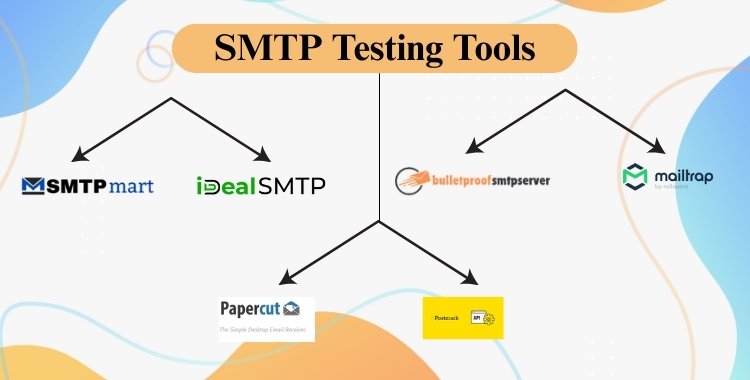
1. Mailtrap
- A safe sandbox SMTP server for testing email functionality in staging or development environments.
- Helps developers monitor the workflow of SMTP without actually sending emails to real recipients.
2. iDealsmtp
- iDealsmtp allows businesses to send bulk promotional and transactional emails reliably.
- Provides robust SMTP relay to ensure secure email delivery across multiple domains.
3. Postmark
- A transactional email service that offers real-time monitoring and detailed activity logs.
- Provides visibility into how the SMTP protocol works for every email you send.
4. SMTPmart
- SMTPmart uses the Simple Mail Transfer Protocol (SMTP) to send bulk and transactional emails reliably across domains.
- SMTPmart optimized to improve inbox placement using warmed-up IPs, SPF/DKIM configuration, and DMARC alignment.
5. Papercut SMTP
- A lightweight desktop SMTP server for testing locally without external dependencies.
- Useful for debugging apps or checking the function of smtp protocol during development.
6. Bulletproofsmtpserver
- A bulletproofsmtpserver safeguards your data, prevents blacklisting, and ensures excellent deliverability.
- A bulletproof SMTP server is designed to transmit emails efficiently while providing enhanced security and reliability.
Even when using powerful infrastructure like bulletproofsmtpserver, these tools help verify that the system is configured correctly and compliant with best practices.
Techniques for Ensuring Email Deliverability
In addition to tools, effective SMTP testing and monitoring includes validation techniques that protect your sender reputation and inbox placement:
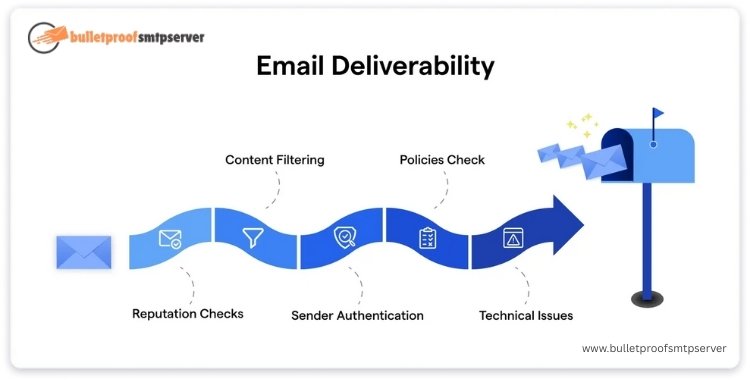
- SPF (Sender Policy Framework)
Ensures your domain only allows specific IPs or servers (like bulletproofsmtpserver) to send mail, preventing spoofing. - DKIM (DomainKeys Identified Mail)
Adds a digital signature to every outgoing email, verifying its integrity and authenticity. - DMARC (Domain-based Message Authentication, Reporting, and Conformance)
Combines SPF and DKIM to define what recipient servers should do if an email fails authentication.
Implementing these validation techniques helps prove to receiving mail servers that your emails are legitimate, which is essential in understanding the broader operation of SMTP in real-world applications.
Strategy to Use bulletproofsmtpserver for High-Volume, Secure Delivery
When managing large-scale email campaigns or critical transactional messages, reliability and deliverability are non-negotiable. That’s why businesses trust bulletproofsmtpserver, a robust SMTP provider built for:
- Secure delivery with SMTP TLS encryption
- Enforced SMTP authentication to block spammers
- High-volume sending without delays
- Built-in support for SPF, DKIM, and DMARC setup
- Scalable SMTP relay systems for marketing automation tools.
This type of infrastructure simplifies how smtp protocol works in high-demand environments, allowing teams to focus on content and strategy rather than server management.
Using the right tools and techniques helps ensure that your SMTP configuration isn’t just functional, it’s optimized. Whether you’re troubleshooting delivery issues or preparing for a product launch, mastering these solutions is key to making the most of your email system.
And with platforms like bulletproofsmtpserver, you get a head start with tested, secure, and scalable infrastructure that brings the full power of the SMTP protocol to your business.
Real-World Applications of SMTP
Now that you understand how does SMTP work, let’s explore its practical applications across different industries. From bulk email campaigns to mission-critical systems, the SMTP protocol powers the delivery of billions of messages every day. Whether you’re a marketer, developer, or IT professional, knowing where and how to use SMTP can significantly improve your communication systems.
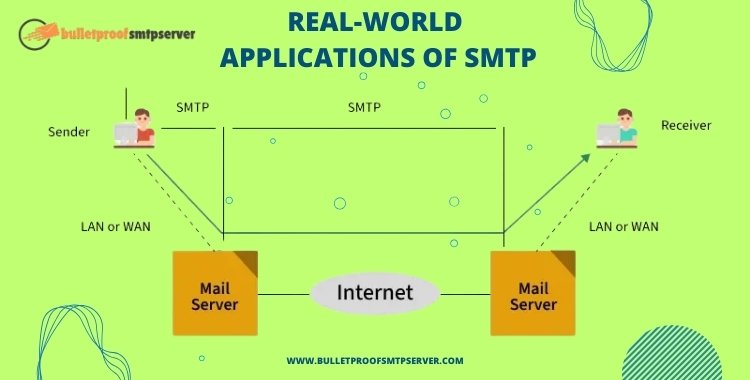
SMTP in Email Marketing
Email marketing is one of the most common use cases for SMTP servers. Businesses use SMTP to send promotional emails, newsletters, product launches, and customer re-engagement campaigns.
Key functions of SMTP protocol work in email marketing:
- Ensures high inbox placement through smtp authentication
- Uses SMTP relay to distribute emails to diverse recipients across domains
- Supports scalability and high-volume sending
bulletproofsmtpserver is particularly effective for email marketing due to:
- Dedicated IPs with strong sender reputation
- Integrated SPF, DKIM, and DMARC validation
- High throughput to support campaigns of any size
If you’re serious about deliverability and avoiding spam folders, using a dedicated SMTP provider like bulletproofsmtpserver is essential.
SMTP in Transactional Email Services
Transactional emails include password resets, order confirmations, shipping notifications, and account alerts. These emails must be delivered reliably and instantly, which is exactly how SMTP protocol works when optimized.
In this context, how SMTP relay works is especially important:
- The email client or app triggers a message.
- The SMTP server (e.g., bulletproofsmtpserver) processes and relays it.
- The message is securely delivered via TLS to the recipient’s inbox.
Using SMTP TLS encryption and SMTP authentication, these messages remain secure and compliant with data privacy standards.
For example, an e-commerce store might use bulletproofsmtpserver to send automated receipts and order updates with 99.9% uptime and encrypted delivery.
SMTP in Enterprise Applications
Large organizations rely on SMTP servers to power internal and external communications between departments, customers, and automated systems.
Here’s how enterprises leverage SMTP protocol work:
Internal tools like HR portals or CRM systems send scheduled updates and reports.
Authentication tokens, logs, and system alerts are sent via SMTP relay.
Custom applications integrate SMTP authentication to protect outgoing messages.
bulletproofsmtpserver supports enterprise-grade features such as:
- Multiple domain and IP bindings
- Role-based access control for secure SMTP usage
- Analytics and real-time delivery tracking
In an enterprise environment, knowing how does SMTP work enables system administrators to set up efficient, scalable, and secure communication pipelines.
From digital marketing to transactional systems, the real-world application of SMTP is extensive and indispensable. By implementing trusted infrastructure like bulletproofsmtpserver, businesses can ensure reliable, secure, and high-performing email delivery across all their communication channels.
Final Thoughts
Understanding how does SMTP work is essential for anyone managing email communications, whether you’re a developer, marketer, or IT administrator. From sending a personal message to delivering a marketing campaign to thousands, the operation of SMTP powers every stage of email transmission, from message composition to secure delivery.
Throughout this guide, we’ve explored:
- The function of SMTP protocol and its role in routing emails between servers
- The step-by-step workflow of SMTP, including authentication, relay, and encryption
- Tools and techniques to monitor, test, and secure your SMTP infrastructure
- Real-world applications like email marketing, transactional messaging, and enterprise systems
When it comes to putting this knowledge into practice, using a trusted and high-performance SMTP solution is key. That’s where bulletproofsmtpserver stands out. Whether you’re sending newsletters, automated alerts, or bulk campaigns, bulletproofsmtpserver offers:
- Strong SMTP authentication to prevent abuse
- Reliable SMTP relay for global message routing
- Full support for SMTP TLS encryption for data privacy
- Scalable delivery for both small businesses and enterprise-level senders
From campaign planning to transactional delivery, bulletproofsmtpserver helps ensure your messages reach inboxes, not spam folders.
Practical Use Cases of SMTP in Action:
- An e-commerce brand sending automated shipping updates
- A SaaS company delivering password resets and onboarding emails
- A digital marketer running segmented newsletters through a high-volume SMTP relay
- A startup monitoring logs and alerts using SMTP-based internal notifications
In summary, understanding the operation of SMTP equips you to send emails more reliably, avoid deliverability issues, and improve security across your communication channels. Start testing your email workflows today with tools like Mailtrap or smtp-cli, and when you’re ready to scale, consider moving to a robust platform like bulletproofsmtpserver for professional-grade results.
FAQs:
If you’re exploring email protocols, you’re likely to have a few common questions. Below, we break down the most frequently asked questions to help you better understand the operation of SMTP, its use in marketing, and how it compares with other email technologies.
How does SMTP work step by step?
SMTP (Simple Mail Transfer Protocol) works by transferring emails from the sender’s client to the recipient’s mail server through a sequence of structured.
Providers like bulletproofsmtpserver automate and optimize this process, handling thousands of messages per second securely and reliably.
How does SMTP authentication work?
SMTP authentication ensures only authorized users can send emails through a mail server. With platforms like bulletproofsmtpserver, this security layer helps prevent spammers from abusing the system, supporting compliance with industry standards like SPF, DKIM, and DMARC.
What’s the role of SMTP relay in email marketing?
SMTP relay plays a vital role in enabling bulk and cross-domain email delivery in marketing campaigns.
bulletproofsmtpserver specializes in efficient, secure SMTP relays, ensuring high deliverability and inbox placement, crucial for marketers sending newsletters, offers, and transactional emails.
Why is TLS important in SMTP?
TLS (Transport Layer Security) protects emails during transmission by encrypting the communication between the client and the SMTP server. Without TLS, email data, including passwords and message content, can be intercepted. That’s why bulletproofsmtpserver enforces modern TLS standards, keeping sensitive data safe.
How does SMTP compare to IMAP and POP3?
SMTP, IMAP, and POP3 are all email protocols, but serve different functions:
protocol: Function:
SMTP Sends and relays outgoing emails
IMAP Accesses and manages email on the server
POP3 Downloads emails to a device and deletes them from the server